FAQ
Should I upgrade from VVTetraVST to VVEncode?
The signal paths in the two encoders, VVTetraVST and VVEncode, are the same. There is no compromise in audio quality when using the older plugin. A current VVTetraVST user might upgrade if switching to a new platform that requires either 64 bit VST or AAX. If you can still use a 32 bit VST plugin, then the address mode switch and the activity lights probably aren't worth the upgrade.
Where should my calibrations files go?
For VVEncode, you can place your calibration files anywhere and then import them.
For VVMic and VVTetraVST, calibration files should be placed in the following directories, depending on your operating system:
Mac
/Library/Audio/Plug-Ins/VST/calibrations
or
$/Library/Audio/Plug-Ins/VST/calibrations
Windows
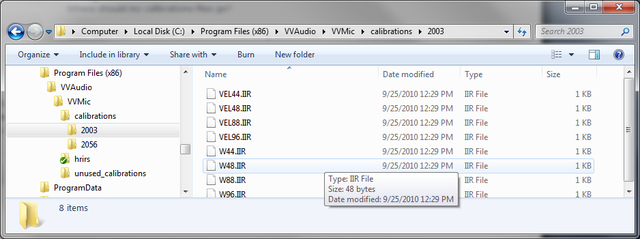
The ####.txt file goes in C:\Program Files\VVAudio\VVMic\calibrations
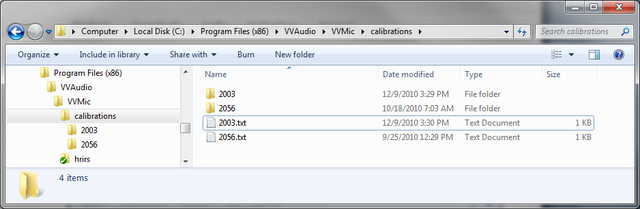
and the rest of the files in a similarly named directory under calibrations
Are Mac's Supported?
All VVStandard plugins, included VVEncode run on Mac and Windows
The two free VST's, VVMicVST and VVTetraVST are available as Mac universal binaries as well as for Windows.
The program VVMic for TetraMic is only available for Windows, but works find under emulation.
What hosts do VVMicVST and VVTetraVST work in?
ProTools is still the industry standard and we are now happy to support it. Reaper is an inexpensive but very useful DAW for both Mac and Windows that supports multichannel plugins well. Steinberg's Nuendo has solid surround support. AudioMulch for Windows, Max/MSP for Mac and Plogue for both are all patcher style programs that work well. Example patches for all of these programs are available on the
Downloads page.
Our VVSDK library runs on linux.
ALSA plugins to support Core Sound's TetraMic are available from Fons Adriaenson at
Kokkini Zita
All of the VVStandard plugins will support ProTools, both AAX and RTAS.
VVEncode, the first of these, is available now. Other plugins including pan, rotate and decode, will be available soon.
Documentation
You can download the manual that comes with VVMic or TetraMic
here
The manual that comes with VVEncode is
Getting Started with VVEncode
Contact
support@vvaudio.com